

Understanding Your Monthly Website Traffic Summaries

How to read and use the information provided in your MissionGuide web summary reports.

As part of our commitment to serving you, MissionGuide provides monthly summary reports detailing the traffic your organization profile and mission trips receive on our platform. These reports are generated through Google Analytics and are designed to help you understand the visibility and reach of your posted trips.

We recognize that many factors can influence the level of interest in your mission trips throughout the year. These may include changing audience preferences, current global events, trending regions or people groups, shifting search keywords, and other time-sensitive elements that affect how visitors find and engage with your pages on MissionGuide.

Our goal is to see more people engaged in the Great Commission and finding places to serve with trusted organizations just like yours. We are grateful for your partnership with us and allowing us to serve your ministry and connect people with you to go and serve all over the globe.

We are working hard every year to find ways to drive more traffic to our website and your trips. 

Here are some of the benefits of partnering with our widely used platform, MissionGuide:

  • Because MissionGuide ranks highly in search results for “mission trips” and “short-term mission trips,” those searches drive people directly to your trips and ministry name on our platform. In fact, MissionGuide consistently appears as a top organic search result and remains on the first page for similar keyword searches. Approximately 20% of visitors to MissionGuide.global arrive through a specific trip description found via Google or other search engines.
  • Mission trips listed on MissionGuide.global are displayed in the search results an average of 16,000- 20,000 times per month.
  • Our users have a high interest in missions. Over 80% are specifically looking to go on a short-term mission trip within the year.
  • MissionGuide.global delivers instant contacts to your staff from the inquiry forms on your trip pages. These are inquirers who are genuinely interested in your specific opportunity.

When you receive your monthly reports you can use the information to see how your specific trips are being viewed and the general interest in those trips.

Reviewing trips that receive less attention can help identify opportunities to improve engagement—such as updating wording, adding fresh photos, or refining the trip title and target audience. Likewise, analyzing your most-viewed trips can reveal valuable insights into current interests and preferences among those exploring mission opportunities.

Keys words in reading your summary reports:

  • OPV’s Your organization’s profile views. The first line of data shows how many times your organization information page was viewed during the month. People either came there directly as a result of an internet search, search on MissionGuide using the organization tab or from viewing one of your trips and clicking on the “View Organization Profile” link. Although most searchers look at trip pages, this number shows people’s interest in who you are as an agency. This shows direct traffic to your profile. When someone searches for an agency the description on MissionGuide usually shows up right below the actual organization website. For lesser known organizations it can even show up before the organization webpage. That’s why your organization description is essential if well worded.
  • Entrances How many people came directly to your trip description from their search engine without having done a search on MissionGuide.global, or perhaps they had it in their bookmarks. Twenty percent of our browsers enter at a trip page, not the home page. Entrances can indicate your trips are written well and have gained interest.
  • Impressions The number of times this trip appeared in the search results AND was visible on the screen of the person browsing. After choosing criteria and searching on MissionGuide a list of potential trips based on searchers preferences shows your trips in that list. This number also represents if they have looked further at your trip as well.
  • Trip Pageviews The number of times someone clicked on this trip to see all of the details. This means a searcher clicks on your trip to see more about it and hopefully considers using the inquiry form to be contacted by you.
  • Trip Entrances How many times someone displayed all of your trips and only your organization’s trips. They may have come to your trips by way of your organization profile or after looking at one of your trips wanted to see all you offer. Sometimes this can be from a link in one of our newsletters as well. They are looking specifically at what mission opportunities your organization offers.
  • # of Days trip was showing that month before it expires or you delete it. This can help you see how long it was available to searchers and exposure it received a few days or a complete month’s time.
  • Inquires The number of contacts that sent an inquiry to you about your specific trips. These are automatically sent instantly to the email you provide in the control panel when adding trips. In order to deliver you direct inquires when searchers are at their peak interest please do not add application or other weblinks as we have seen this not produce as many inquires as possible.
  • If the number in the monthly reports is different then your records, first check your spam folder for auto email notifications/inquiries from [email protected] as they may end up there. If the number is still different please contact customer service and we can look into it. [email protected]

Below are screenshots of a sample report and tips on reading the findings.  

Screenshot of sample summary report:

Page 1 Organizational Profile Views (OPVs)
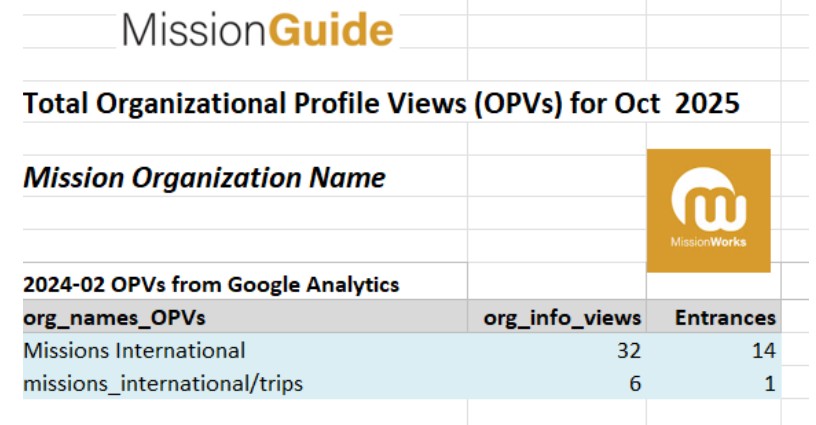
  1. The first line of data shows how many times your organization information page was viewed during the month. 
  2. The second line with the word “trips” shows how many times someone displayed all of your organization’s trips and only your trips.
  3. The last column named “entrances” shows how many times someone came directly to that page from their search engine (Google, etc) without doing a search on MissionGuide.global.                                                                 

Screenshot of sample summary report:

Page 2 Total Trip Detail Views (TDVs)
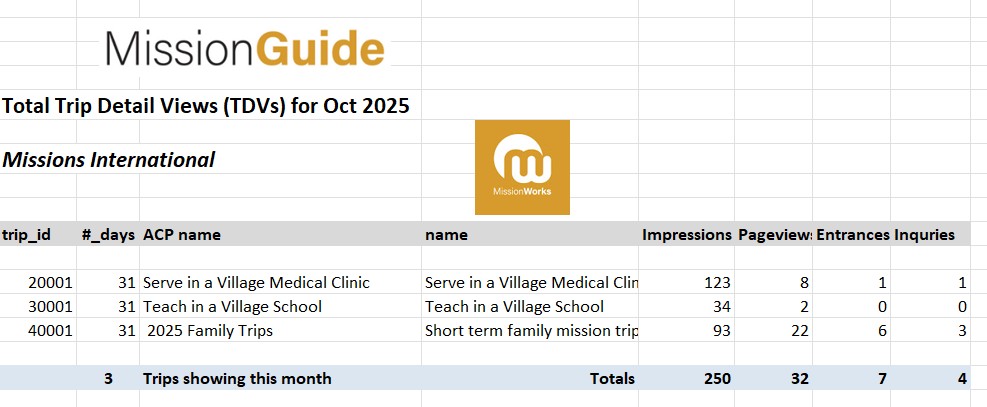
 

  1. The trip id is the one generated from our website to identify each individual trip and for tracking purposes.
  2. The number of days is how long you had your trips published on MissionGuide that particular month.
  3. The ACP name is the internal name you gave your trip in the back end of the website and the name is the title showing to the public for that trip.
  4. Impressions are how many viewed either your trip in a list of possible trips after a search on MissionGuide or looked at your trip alone.  
  5. Pageviews are the number of times someone clicked on your trip to see full details.
  6. Entrances are how many times people came directly to your trip without doing a search on MissionGuide. They entered the trip from your description from a search engine.
  7. Inquiries are how many contact/inquiry forms were sent to the email address you choose for each trip.                             

Helpful things to consider: You want to be sure your organization information page on MissionGuide.global is well worded, accurate and really does a good job of communicating who you are and all the great opportunities you offer!  Also the better your trip description, the better people will understand your trip, but also the more people will come to it directly from Google and other search engines.

Thank you for parenting with us at MissionGuide and sharing your ministry and mission trips with us and those ready to go and serve.

We would love to hear from you any impact stories of those who have found your trips on our website and served with you!

For help on writing up your trips see https://missionguide.global/articles/entering_opportunties_helpful_tips or https://missionguide.global/articles/tips. For other helpful articles see: https://missionguide.global/category/agency-articles

Contact [email protected] if you have any questions or concerns or would like to add others in your organization to receive these monthly reports.  

Written by MissionGuide Staff          

Search 561 short-term mission trips from 48 different organizations.

Search Now
Get monthly exclusive upcoming opportunities, preparation tips & articles to help you make the most of your mission journey.